
Update key takeaways and FAQ
Signing documents no longer requires printing, scanning, or sending paperwork through email. With electronic signature technology, you can eSign a document online in just a few minutes from your computer or smartphone.
Whether you need to sign a contract, approve a business agreement, or complete a digital form, electronic signatures provide a fast, secure, and paperless way to finalize documents online.
In this guide, you’ll learn how to eSign a document online, how to eSign a PDF document, and how businesses are simplifying document workflows with secure eSignature platforms.
Quick Answer: How to eSign a Document Online
To eSign a document online, follow these steps:
- Upload the document to an eSignature platform.
- Add signer details such as name, email, or phone number.
- Place the signature field on the document.
- Verify the signer’s identity through authentication.
- Apply the electronic signature.
- Download the signed document.
This process allows users to eSign PDF documents online quickly without printing or scanning physical copies.
What is an eSignature?
An electronic signature (eSignature) is a digital method used to sign documents electronically instead of using a handwritten signature.
It allows individuals and businesses to approve agreements, contracts, and forms digitally using secure verification methods.
Electronic signatures eliminate manual paperwork and allow documents to be signed from anywhere using an internet-enabled device.
Is eSigning Legally Valid?
Yes. Electronic signatures are legally recognized in many countries and are widely used for business and legal documentation.
As long as the signing process includes:
- Identity verification
- Secure authentication
- Document integrity protection
- A complete audit trail
the signed document can serve as a legally valid agreement.
How to eSign a PDF Document
Many users specifically search for how to eSign a PDF document.
Fortunately, signing a PDF electronically is simple and follows a similar process.
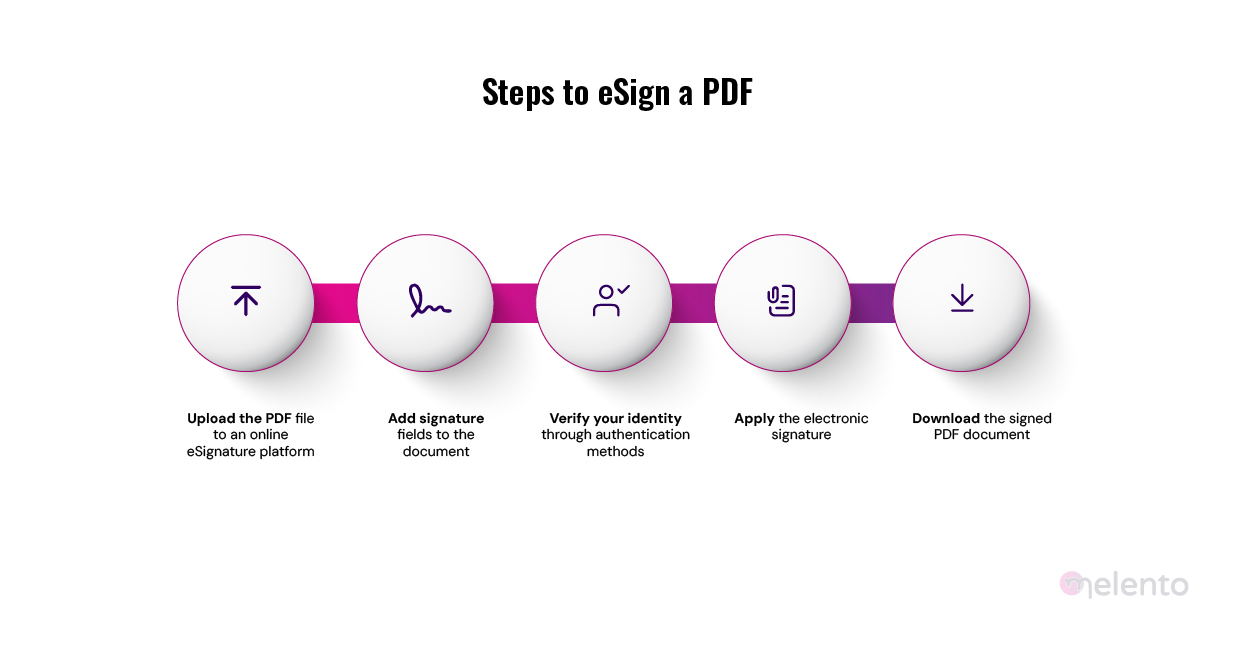
Steps to eSign a PDF
- Upload the PDF file to an online eSignature platform.
- Add your signature field to the document.
- Verify your identity through the platform.
- Apply the electronic signature.
- Download the signed PDF document.
This allows users to eSign PDF documents online without printing or manually signing them.
Steps to eSign a Document Online
| Step | Action | Description |
| 1 | Upload Document | Upload the document or PDF file to the eSign platform |
| 2 | Add Signer | Enter signer details such as name or email |
| 3 | Place Signature | Add signature fields to the document |
| 4 | Verify Identity | Authenticate the signer using verification methods |
| 5 | Sign Document | Apply the electronic signature |
| 6 | Download | Save or share the signed document |
Benefits of eSigning Documents Online
Electronic signatures provide several advantages for both individuals and businesses.
- Faster Document Signing
Documents can be signed within minutes instead of waiting days for physical approvals.
- Paperless Process
eSigning removes the need for printing, scanning, or storing paper documents.
- Improved Security
Modern eSign platforms use encryption, authentication, and activity tracking to secure documents.
- Remote Signing
Documents can be signed from anywhere using a laptop, smartphone, or tablet.
- Better Workflow Efficiency
Businesses can automate document approvals and streamline contract execution.
Common Use Cases for eSigning Documents
Electronic signatures are widely used across industries to simplify document approvals.
Some common use cases include:
- Business contracts
- Vendor agreements
- Employee onboarding forms
- Service agreements
- Sales contracts
- Insurance documentation
- Financial applications
By enabling digital signing, organizations can accelerate document workflows and reduce administrative effort.
Why Businesses Use eSign Platforms
Organizations increasingly rely on eSign platforms to manage document approvals and digital agreements.
Key advantages include:
- Faster contract turnaround
- Centralized document management
- Automated workflows
- Secure document storage
- Detailed audit trails for compliance
These features help businesses handle high volumes of agreements without manual paperwork.
Why Melento is a Reliable eSign Platform
Melento provides a modern electronic signature platform that helps organizations securely sign and manage documents online.
With Melento, businesses can send documents for signing, automate approval workflows, and track document status in real time.
Key Features of Melento eSign
- Easy Document Signing
Users can upload documents, add signers, and collect signatures digitally.
- Secure Authentication
Melento supports multiple identity verification methods to ensure documents are signed securely.
- Automated Workflows
Businesses can create automated approval flows for contracts and agreements.
- Detailed Audit Trails
Every signed document includes a record of signing activity for transparency and compliance.
- Bulk Signing
Organizations can send multiple documents for signing simultaneously.
- Seamless Integration
Melento integrates easily with business applications and workflow systems.
Because of its security, ease of use, and automation capabilities, Melento helps organizations simplify document signing and manage agreements more efficiently.
Conclusion
Electronic signatures have transformed the way documents are signed and approved. Instead of relying on manual paperwork, individuals and businesses can now eSign documents online, sign PDF files digitally, and complete agreements faster.
By adopting a reliable eSign platform, organizations can simplify document workflows, reduce paperwork, and accelerate approvals.
Solutions like Melento make it easy to send, sign, and manage documents online securely, helping businesses handle agreements more efficiently in a fully digital environment.