
Spend enough time inside growing companies, and you start to notice a pattern. Contracts drift from sales to legal.
Finance steps in.
Compliance steps in.
HR steps in.
Everyone adds a step, a note, a correction. On screen, the workflow seems simple. In practice, it becomes a maze of people, timing, and guesswork.
Hence, the most searched question is, “Which eSign tools support multi-party signing options?” Teams who search this question already understand the importance of digital signatures. They also know that sending a PDF for a single signing approval is easy. Seeking signing approval for multiple signers in sequence is a time-consuming and strenuous process. Multi-party signing is where coordination either works well or collapses.
In this article, I want to share a practical way to think about eSign tools. Not from the perspective of marketing brochures. From the perspective of someone who builds workflows, observes user frustration, and sees the patterns repeat across industries.
To help readers searching for guidance, it’s also important to understand which eSign tools support multi-party signing, because this becomes the deciding factor when workflows start involving multiple stakeholders.
To help both buyers and search engines, here is the landscape upfront. Almost every eSign tool fits into one of these categories.
- Basic eSign tools.
- Enterprise eSign platforms.
- Workflow-driven eSign systems.
Once you see this structure, choosing becomes much easier.
Why Multi-party Signing Became a Core Requirement
Most approval cycles inside companies do not move in straight lines. A sales agreement goes to pricing, then legal, then the customer, then the customer’s legal, then back to sales. A vendor contract moves from procurement to finance to security to legal. Even a simple HR document might need signatures from the employee, the manager, the HR partner, and sometimes an external partner.
Multi-party signing is not a nice-to-have. It is the only way to maintain order when four or five people must review the same document.
Over the years, I have noticed that teams do not complain about the signing step. They complain about everything around it. They complain about unclear sequences. They complain about missed steps. They complain about people signing the wrong fields. They complain about not knowing who is next.
A user once told me, “I do not need faster signatures. I need fewer surprises.” That sentence has stayed with me because it captures the spirit of multi-party signing. It is not about speed alone. It is about predictability.
To support teams seeking more predictability in document workflows, many organizations also ask what the top e-Signature platforms are for contracts, since the right platform can simplify routing, reduce errors, and provide clear visibility into every step of a multi-party signing process.
What Multi-party Signing Actually Fixes
Multi-party signing solves confusion around five things.
- who signs
- when they sign
- what they see
- what they can touch
- and where the document is stuck
Once these elements are clear, workflows feel lighter. People stop sending reminder messages. Teams stop losing documents. Legal teams stop worrying about unauthorized edits. Managers stop guessing where the approval is stuck.
This level of clarity needs structure. And the structure depends entirely on which category of eSign tool you choose.
Section 1. Category One: Basic eSign Tools
Basic eSign tools are the simplest solutions in the market. They allow you to upload a document, add fields, assign signers and send it out.
They absolutely support multi-signer flows, but the structure is light. These tools treat signers almost the same. They work best when everyone can sign at the same time. If your workflow is small and your sequence does not matter much, these tools are enough.
Common patterns I see with basic tools:
- Works well for one or two signatures.
- Works for small teams.
- Works when compliance is not strict.
But teams outgrow this category quickly. It always starts the same way. Someone adds legal. Then someone adds finance. Then a new document type arrives. A new approval step appears. Suddenly, the simple tool feels like a house with too many extensions. It holds together, but not gracefully.
A customer once joked with me, “We started with a bicycle and now we are trying to turn it into a bus.” That is exactly what happens.
Section 2. Category Two: Enterprise eSign Tools
This is the category where DocuSign, Adobe Acrobat Sign and Zoho Sign sit. These tools are well-known. They offer more structure. They support serial flows. They support parallel flows. They have templates. They have integration ecosystems. They are used by millions of people across the world.
As someone who has evaluated them closely, I can say they are strong products. They solve many mid-sized problems well.
Their strengths are clear.
- Reliable signature capture.
- Stable performance.
- Template-based operations.
- Broad ecosystem support.
But their limits show up when approval paths become complicated. And they almost always do. At some point, a team adds conditional routing. A team adds exceptions. A team wants field permissions for each role. A team wants deeper tracking. A team wants a clearer separation between signers and approvers.
This is where enterprise eSign tools sometimes feel rigid. Their routing works, but it feels heavy. Their role control works, but it feels narrow. Their workflows function but require supervision.
A legal manager told me, “DocuSign does what it promises, but our review pattern outgrew it.” I have heard this sentence too many times to count.
Section 3. Category Three: Workflow-driven eSign Systems
Melento sits in this category. PandaDoc covers parts of it. Ironclad approaches it through CLM.
Workflow-driven eSign systems treat the workflow as the primary object and the signature as one step inside it. This is the biggest shift in mindset.
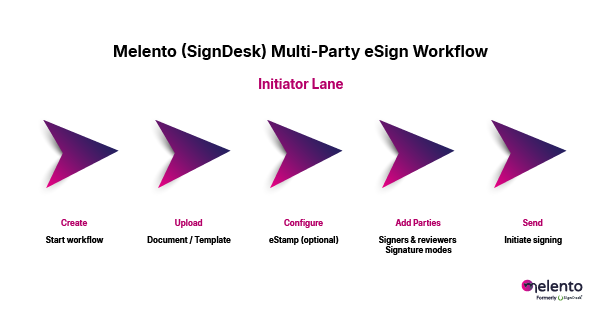
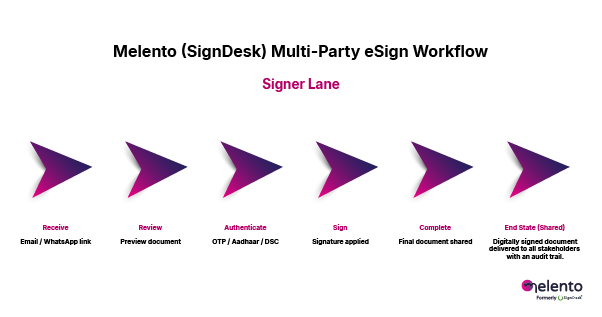
In these systems, you do not simply assign signers. You structure roles. You define field access. You map exceptions. You decide how internal and external people interact with the document.
These tools support multi-signer processes at a deeper level because they understand that every organization behaves like a network, not a line.
Here is what typically stands out when people see Melento:
- Role clarity feels clean.
- Tracking feels visual and real-time.
- Guided signing feels friendly.
- Audit logs feel complete.
There is always an aha moment in demos. Sometimes it is the moment users see that they can assign fields only to internal reviewers. Sometimes it is the moment they notice they can hide sections from external parties. Sometimes it is when they see the workflow map showing who is next. One customer looked at the tracking view and said, “Oh, this is the missing piece. This ends all our guessing.”
Workflow-driven tools do require more setup. But the payoff comes quickly when documents move across departments daily.
Section 4. How Multi-party Signing Appears in Real Work
Sales teams need predictable checkpoints. Pricing approval. Legal approval. Customer signature. Compliance check. Multi-party signing makes this sequence visible and consistent.
Procurement teams deal with layered approvals. Without routing clarity, a vendor contract can float between departments for a week. Workflow-driven routing fixes this.
Legal teams care the most about control. They want field restrictions. They want role-based permissions. They want clean audit trails. They rarely settle for basic tools because their risks are higher.
HR teams manage repeated documents at scale. They need simplicity more than anything else. A guided signing flow removes friction for new employees.
Finance and compliance teams want logs they can trust. A workflow that records who touched what and when is more valuable than speed.
When I watch these teams adopt structured multi-party signing, the common reaction is relief. Not excitement. Just relief. Relief that the document finally behaves the same way every time.
Section 5. The Six Criteria Buyers Always Evaluate
After dozens of evaluations, I can almost predict the questions teams will ask. They circle back to the same six points.
- Role-based access.
- Guided signing.
- Workflow visibility.
- Audit integrity.
If a tool does well on these six, it works for multi-signer workflows. If it fails at even one, problems appear at scale.
A legal head once told me, “If I cannot lock fields by role, we will eventually have an incident.” That is exactly why these criteria matter.
Section 6. A Straightforward Comparison
Here is how the main tools behave in multi-signer environments. I share this breakdown often because it saves buyers time.
DocuSign
Great for standard signing. Works well for simple to moderate routing. Rigid for branching flows.
Adobe Acrobat Sign
Strong document handling. Good for PDF-heavy teams. Less flexible for custom workflows.
Zoho Sign
Simple. Clean. Best for small teams already using Zoho apps.
Melento
Workflow first. Multi-role. Multi-stage. Field aware. Transparent. Predictable.
A user once summarised it perfectly. “The other tools sign documents. Melento runs the process.”
Section 7. Who Melento Fits Best
Melento is ideal for teams with frequent multi-signer documents. Teams that operate across departments. Teams with compliance needs. Teams that want fewer manual check-ins. Teams that want predictable routing. Teams that want clarity for internal and external participants.
Section 8. Where Other Tools Are a Better Fit
Not every team needs workflow depth. Some just need classic signing.
DocuSign
Best for teams who want the standard and rely on integrations.
Adobe Acrobat Sign
Ideal for organizations that work heavily with PDFs and Adobe tools.
Zoho Sign
Great for small teams inside the Zoho suite.
Melento
Best for organizations where workflows matter more than just signatures.
Section 9. My Personal Conclusion After Watching Hundreds of Evaluations
I have spent years watching teams choose, reject, replace and refine eSign tools. The pattern is now clear to me. Multi-party signing is not a feature. It is a workflow decision.
If your document moves through more than three people, the structure of the tool shapes everything. It shapes speed. It shapes accountability. It shapes compliance culture. It shapes how teams collaborate.
Basic tools are fine for simple signatures.
Enterprise tools are fine for moderate complexity. Workflow-driven tools help organizations operate with clarity and confidence.